Liquid Rocket Engine Design Suite

Size a thrust chamber without guessing.

Equilibrium thermochemistry, nozzle profiling, conjugate heat transfer with regenerative cooling, and structural margins — one workflow, one desktop application, and every model states what it was validated against.

↓ Download the demo Buy — Windows 10/11 · offline · no account
Validation

Numbers you can check, not claims you have to trust.

Most engine calculators are a spreadsheet with the isentropic relations in it. CSTAR carries its own Gibbs-minimisation thermochemistry solver, and every release is gated on a test suite that compares it against reference codes. Here is what that suite reports.

ModuleChecked againstWorst deviationPoints
Equilibrium thermochemistry NASA CEA Tc 2.7 K · γ 0.01 % · Isp 0.03 % 145
Coolant properties CoolProp (NIST-grade EOS) ρ 2.0 % · cp 4.2 % · μ 3.0 % 6 000
Nozzle contour (planar MoC) Exact Prandtl–Meyer theory Mach 0.003 % · mass 0.03 % 16

Thermochemistry is validated across Pc = 10–250 bar and ε = 4–150 — the envelope you actually work in, not a single convenient operating point.

Capabilities

The whole chamber, in one solve.

Every image below is real output from the example engine that ships with the application.
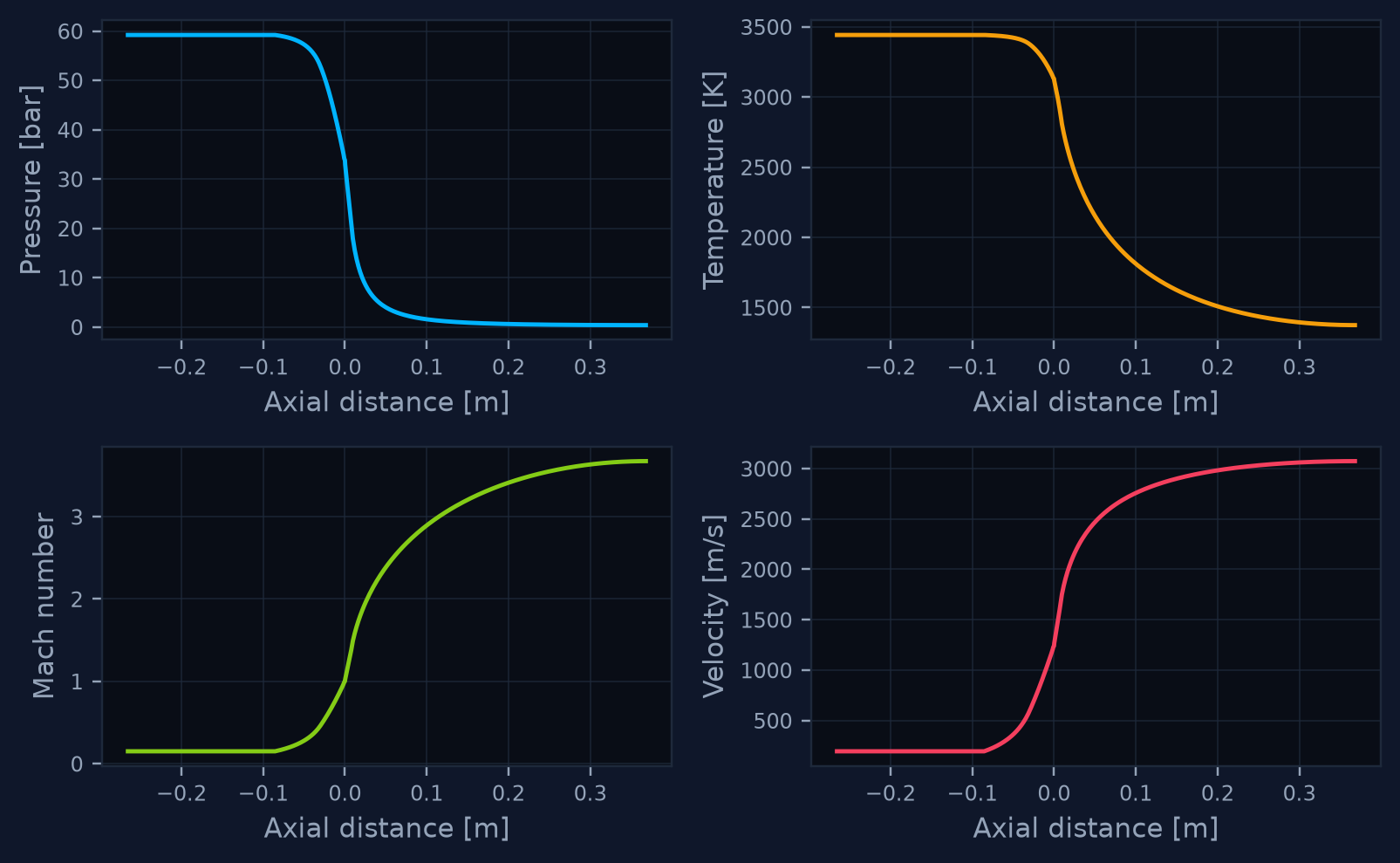
Pressure, temperature, Mach and velocity along the axis

Thermochemistry & gas dynamics

Gibbs-minimisation equilibrium over 17 species with condensed carbon, frozen nozzle expansion on the real contour areas, and a two-branch area–Mach solver with self-consistent variable γ. Six propellant combinations built in.
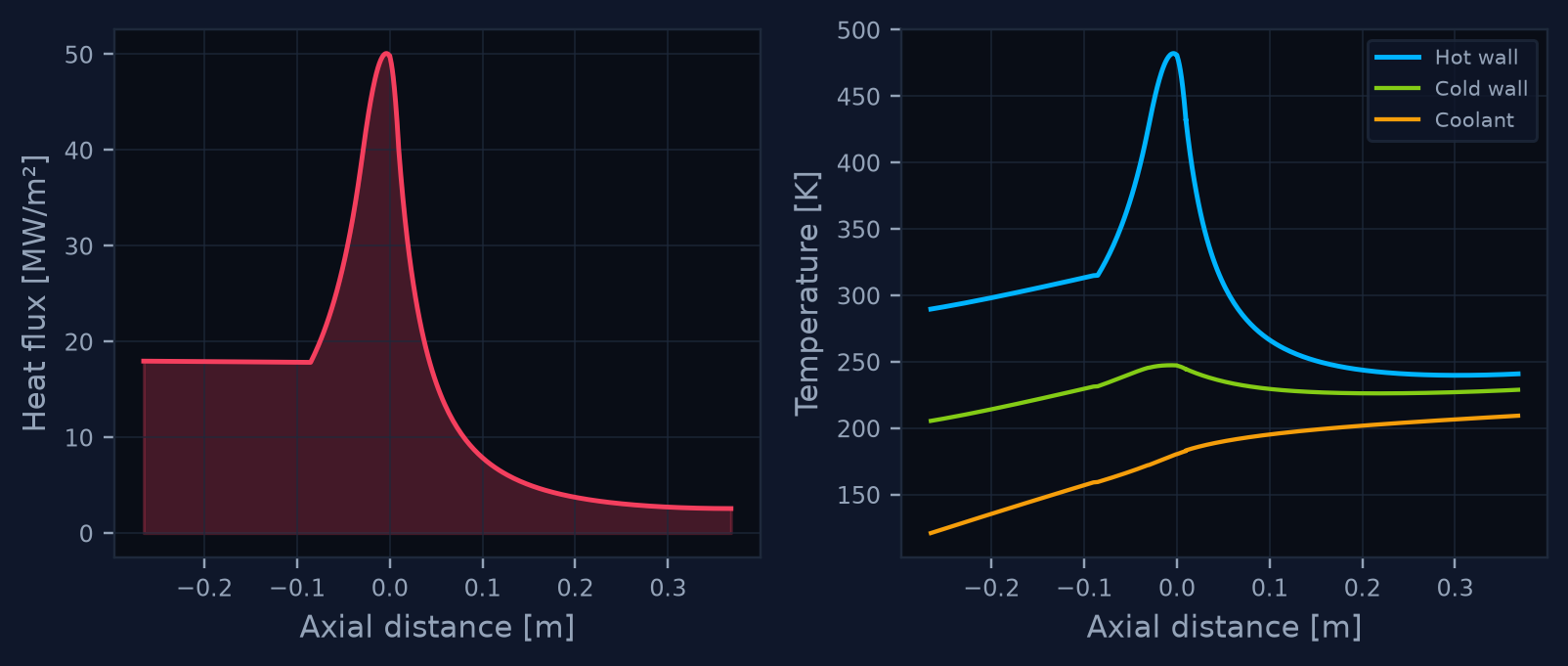
Heat flux and wall temperature distributions

Conjugate heat transfer

Bartz on real gas properties, Gnielinski with roughness-aware friction, and Sieder–Tate at the coolant-side wall. Coolant density, heat capacity, viscosity and conductivity vary with local temperature and pressure — five fluids from NIST-grade tables. Channel lands are solved as fins.
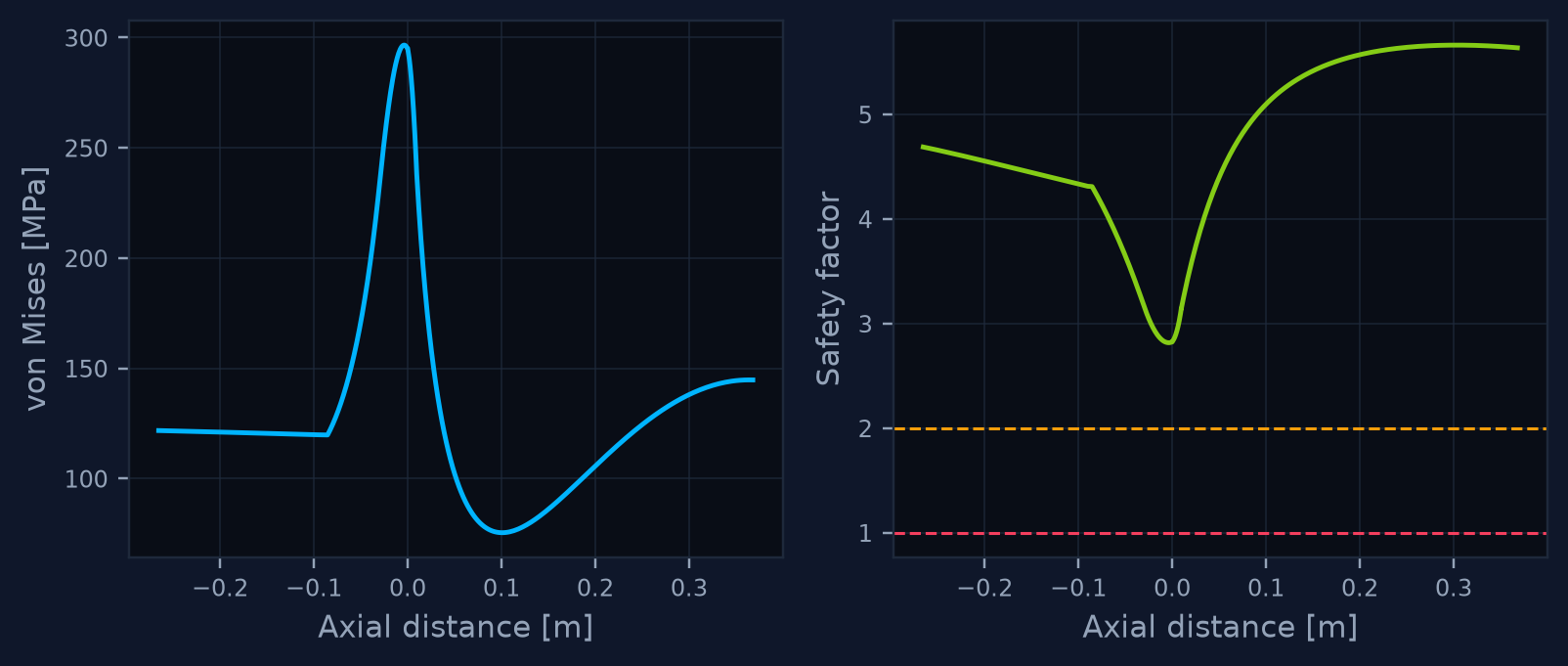
von Mises stress and safety factor along the axis

Structural margins

The liner is treated as what it is — a thin wall spanning between cooling channel lands, loaded by the real coolant-to-gas pressure difference and the through-thickness gradient. Yield, jacket hoop, liner buckling and a low-cycle-fatigue screening figure, all four at once.
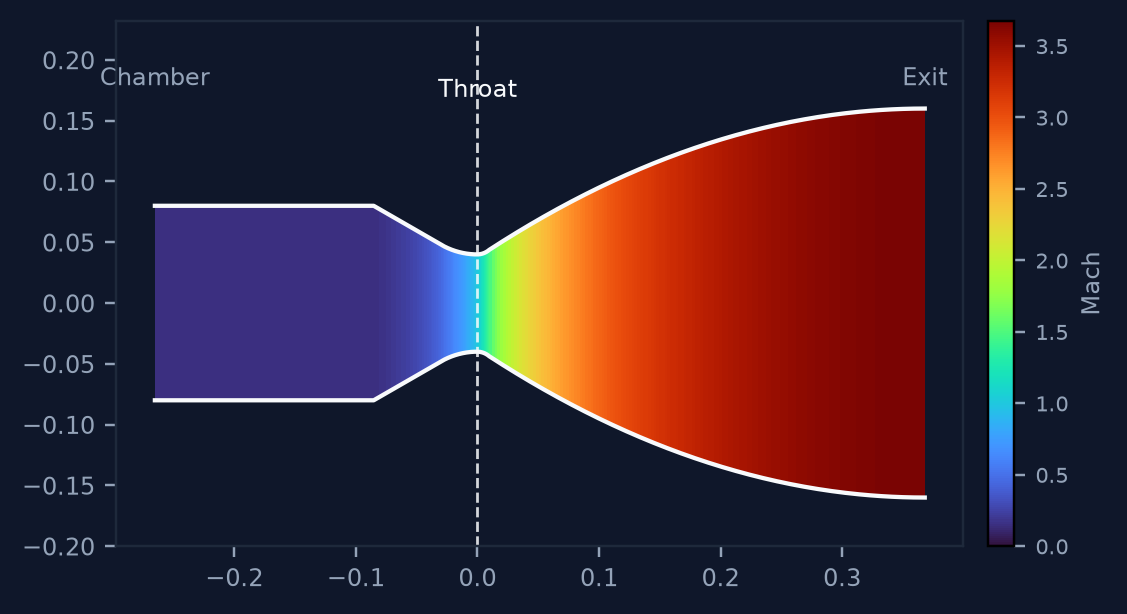
Nozzle contour shaded by Mach number

Exports an engineer can hand over

Per-station CSV, nozzle profile as CAD-ready coordinates, a styled Excel workbook, and a full PDF report with the charts, the model description and the stated limits included.

Editions

Try the gas dynamics free. Pay for the hard part.

The demo is the same executable, not a crippled build. It runs your engine and shows you the flow solution. Heat transfer, cooling and structural analysis — the reason the tool exists — are what you are buying.

DEMO
Free
Evaluation only · watermarked output
  • Nozzle geometry & flowfield
  • Gas dynamics — M, P, T, v
  • Thrust, specific impulse, mass flow
  • Runs on your engine, not a fixed sample
  • 🔒Heat flux & wall temperatures
  • 🔒Regenerative cooling circuit
  • 🔒Structural margins & fatigue
  • 🔒CSV / CAD / Excel / PDF export
↓ Download demo
STANDARD
One machine · offline · no subscription
  • Everything in DEMO, without the watermark
  • Conjugate heat transfer & wall temperatures
  • Regenerative cooling with real coolant properties
  • Structural margins, buckling, fatigue screening
  • All four export formats
  • Full documentation incl. validation report
  • Works fully offline — no phone-home
Buy CSTAR
How it works

Three steps, then it is yours offline.

Download & run

One self-contained executable. No Python, no installer dependencies, no account. It opens in DEMO and immediately solves the bundled example engine.

Buy & send your Hardware ID

After purchase you land on a page that walks you through it: press Activate in the toolbar, copy the 16-character Hardware ID, send it over. It is derived from your machine and contains no personal data.

Get your key by email

Keys are issued by hand, so allow a few hours. Your Ed25519-signed key arrives by email, bound to that one machine — paste it in and STANDARD unlocks instantly, then keeps working with no internet connection, forever. The demo stays usable while you wait.

Before you buy

What this tool is not.

You are an engineer. You would find these out anyway, and you would trust the rest less for having had to dig. So here they are.

  • It is a preliminary design aid. Not certified by any aviation, space or standards authority. Everything it outputs needs independent verification before it touches hardware.
  • Heat transfer inherits the Bartz correlation's ±20–30 % scatter against hot-fire data. That is a property of the method, not of the implementation, and no amount of numerical care removes it.
  • Gas radiation is a grey-gas approximation. Real H₂O/CO₂ emission is band-structured. The magnitude lands in the right range; the model is crude, and the coefficients are exposed so you can calibrate against your own data.
  • Structural analysis is closed-form thin-wall, not FEA. No land fillets, no creep, no bulging mode. The fatigue number is a screening estimate with generic constants — it ranks designs, it does not qualify hardware.
  • The nozzle contour is a Rao parabolic approximation, not a characteristic solution. A verified planar method-of-characteristics ships alongside it; the axisymmetric branch is not validated and refuses to run rather than return something unverified.
  • Flow is one-dimensional. No shocks, no separation prediction, no film cooling, no combustion instability.
FAQ

Questions worth asking.

Can I run my own engine in the demo, or only a fixed sample?

Your own. Every input is editable in DEMO and the solver runs your geometry, propellant and chamber conditions. What DEMO withholds is the thermal, cooling and structural results — those are not merely hidden in the interface, an unlicensed run does not compute them for delivery at all.

Is it really validated against NASA CEA, or is that marketing?

Really. The comparison runs through the official CEA code via the rocketcea wrapper, across 145 operating points spanning 10–250 bar chamber pressure and area ratios of 4 to 150. The test suite ships with the application and prints the worst-case deviation for every quantity against a documented tolerance. You can run it yourself.

Does it need an internet connection?

No — not to run, not to activate, not ever. There is no activation server, no telemetry and no phone-home. The license key is verified locally against a public key compiled into the application. Air-gapped machines work fine.

What happens if I change my hardware?

The Hardware ID is derived from your Windows installation GUID, processor and architecture. It deliberately excludes network adapter addresses, so VPNs, docking stations and virtual machines do not disturb it. Reinstalling Windows or moving to a different machine does change it — contact us and we re-issue.

Which propellants and coolants are supported?

Propellants: methalox, kerolox, hydrolox, ethanol, methanol and propane, all with LOX. Coolants with full temperature- and pressure-dependent properties: methane, hydrogen, oxygen, RP-1 and ethanol. Any other fluid can be entered as constant properties.

Can I use it commercially?

Yes. A STANDARD license covers commercial use on one machine. Need several seats? Get in touch and we will sort it out.

See it solve your engine first.

The demo takes a minute and runs your real geometry. If the flow solution does not convince you, nothing on this page should.